Using the new i-Button electronic tags
|
This year, the KIMM is using a newly developed electronic tagging system to record your control punches and times.
You will not have seen this system anywhere else, so you might like to take in the following instructions which
illustrate how to use it, and what to expect.
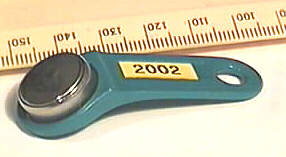
Designed and manufactured by Joe Lee Computing specifically with this event in mind, the system utilises an industry standard tag called an i-Button. |
|
|
The tags comprise a small watch-battery-size
stainless steel unit attached to a small plastic holder. You will be supplied with a generous length of cord to enable
you to securely attach the tag to yourself.
These new tags provide the event management with many advantages over other systems you may have used in Orienteering events. |
Just a few of the benefits
|
What do the controls look like?You will find control boxes in a number of colours: yellow, red, and orange, but the colours have no meaning in this event. Many control points will have 2 or 3 control boxes available to avoid queues, and to provide backup in case any one box fails - you can punch at any box at a given control point.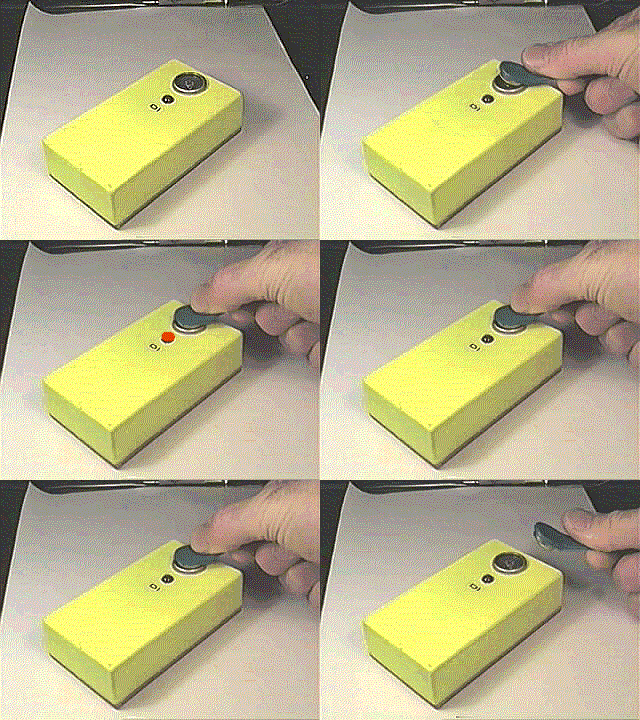
|
How do the tags operate?Operation is slighty different to other tags you may have come across, although the near instantaneous recording is just the same as others. The main difference is that these tags require contact with the control boxes. There are two contacts: the inner and the outer. There are many ways to make this contact but the easiest to describe is a two step movement:
A valid punch will be indicated by the LED flashing, together with beeping. To preserve battery life, the beeping is quite soft, and in most outdoor environments you may not notice it. The rule is: if the control box flashes, you've punched correctly, if not, try again. |
A note about waterThe tags have been tested in all weather conditions from Arctic to Sahara and are very reliable. However, while they work even when wet, they may not work if they are completely swimming in water. If in doubt, simply wipe the tag and the box contacts to clear away any big water droplets before punching. | How long does it take to punch?Each control punch takes only a fraction of a second to register: once the box starts flashing, you can run on - you don't need to wait for the flashing to stop.If you are not sure the punch was correctly recorded, simply re-punch until you see the control box flashing. If, after trying several times, the box still does not respond it may be broken, so if there is another box at that control point, try that one, otherwise record the control on your map using the good-old-fashioned pin punch tied to the control stake. It would also help if you can write down the time of your visit too, so that your results can be kept as informative as possible. |
After the finishAfter the finish (don't forget to punch the finish control), you will be directed to a tag reading point approx 200 metres from the finish to download the information on the tag. Here the operation is the same as with the normal controls, except that the reading may take 2 or 3 seconds, so keep holding the tag in place until the box flashes. An operator will be at this point and may hold the tag in place for you.The tag reading operation is the same for both Day 1 finish at the overnight campsite and at the day 2 finish at Kelburn, except that after day 2 finish you will hand your tag in to the marshalls after you have downloaded. When your tag has been read, a few seconds later you will be given a printout showing all the controls you have visited with the time and split time between successive controls. For score classes, the points awarded for each control and any penalty points acquired will also be shown. Any missing controls will be indicated, and your result for each day will indicate either finished ok or course incomplete. If you disagree with anything printed, proceed to the designated enquiry point - note that the tag reader operators will not be able to assist with any enquiries, so asking them, or trying to explain anything to them will only slow down the reading process for others. Your SafetyYour tag is the only way of identifying who has returned from the hills. If you retire YOU MUST RETURN YOUR TAG to the event center. Teams not handing in their tags will seriously degrade their chances of being accepted for future events. |
|